


Flat television panels create an immediate headache for conference speakers because glossy glass and intense backlights swallow standard red optical beams. Finding the Best Presentation Clickers With Laser For Lcd Tv requires understanding why standard pointers fail against modern monitors. Handheld optical tools like a dedicated laser pointer for astronomy solve open-air visibility with high-output green wavelengths, yet meeting spaces demand remotes tailored for digital monitors. Choosing the right hardware ensures your slides advance reliably while your visual markers remain crisp on high-definition panels.
Modern presenter tools tackle liquid crystal displays through two distinct methods, pairing high-contrast green diodes or software-driven digital overlays with ergonomic wireless remotes. Top configurations feature 2.4GHz USB dongles or Bluetooth Low Energy connections to provide smooth navigation across rooms ranging from 50 to over 300 feet. Built-in tools like vibrating countdown timers, integrated OLED battery monitors, and dedicated slide controls give speakers complete command over their timing. Selecting a properly matched wireless clicker eliminates awkward podium tethering and keeps audience attention focused on your presentation.

Pros
- Green laser is much brighter than red, making it easy to see on outdoor range targets or in well-lit classrooms.
- Long 100-foot range allows you to walk among students during firearm training drills without losing connection.
- Vibrating timer alerts keep you on schedule during multi-hour safety courses or hunting expos.
- Simple plug-and-play setup with no software installation, ready to use right out of the box.
- Compact size and internal receiver storage make it easy to pack in a range bag or briefcase.
Cons
- Not designed for firearm-specific use; it's a presentation tool, not a shooting accessory.
- Battery life is good but not rechargeable, so you'll need to keep spare AAA batteries handy for long training events.
- Laser pointer is not intended for aiming firearms; it's a presentation aid only.
The Logitech Wireless Presenter R800 is a presentation remote designed for professionals who need to deliver clear, engaging talks. While it may not be a firearm or shooting accessory in the traditional sense, it serves a valuable role for firearm instructors, hunting club leaders, and range safety officers who conduct training sessions, safety briefings, or hunting seminars. Its bright green laser pointer and intuitive controls make it a practical tool for any shooter who needs to present information effectively.
This presenter is best suited for sport shooters, hunters, home defense educators, firearm instructors, and outdoor enthusiasts who regularly give presentations. Whether you are teaching a concealed carry class, leading a hunting strategy meeting, or briefing a competitive shooting team, the R800 helps you stay organized and professional. The green laser is particularly useful for pointing out specific details on target diagrams or range layouts, even in well-lit rooms or on LCD screens.
The R800 offers a 100-foot wireless range, allowing you to move freely around the room or outdoor training area. This is especially helpful when you need to demonstrate shooting stances or safety protocols while still controlling your slides. The LCD timer with silent vibrating alerts ensures you respect class schedules, which is critical for multi-hour courses. The buttons are easy to locate by touch, so you never fumble during a presentation.
Build quality is typical Logitech: a durable plastic body with a comfortable contoured grip. The plug-and-play receiver stores inside the remote, making it easy to pack in a range bag or briefcase. Setup is instant - just plug the receiver into a USB port and you are ready to go. No software installation is needed, which is a plus for instructors who use multiple computers.
One realistic limitation is that this is not a firearm accessory. It is a presentation tool, so it does not offer any shooting performance benefits. Additionally, the laser pointer should never be used for aiming firearms; it is strictly for pointing at screens or printed materials. The battery life is good, but it uses standard AAA batteries, so keep spares handy for long training events.
Overall, the Logitech R800 is a solid investment for any firearm instructor, hunting club officer, or range safety officer who frequently gives presentations. It combines reliability, ease of use, and a bright laser pointer in a compact package. If you need a dependable remote for your next shooting-related presentation, this is a practical choice.

Pros
- Easy plug-and-play setup – no drivers needed, just insert the USB receiver
- Bright red laser pointer remains visible even in large conference rooms or lecture halls
- Long 328ft range gives you freedom to walk around and interact with the audience
- Compact and lightweight with a clip for convenient carrying
Cons
- Requires one AAA battery (not included), so you need to have spare batteries on hand
- Laser pointer is red, not green – green may be more visible in bright outdoor conditions
- Limited to presentation control; no additional features like slide annotation or timer
The QUI Presentation Clicker is a versatile wireless presenter remote that, while not a firearm itself, serves as an excellent tool for firearms instructors, sport shooters, and hunters who need to deliver effective training briefings, safety orientations, or hunting trip presentations. Its 2.4GHz USB receiver ensures a stable connection up to 328 feet, allowing you to move freely around the classroom, range, or meeting space while keeping your audience engaged.
This clicker is best suited for firearms instructors who conduct safety courses, competitive shooters reviewing match strategies, and hunters planning trips with their groups. The bright red pointer helps highlight specific points on slides, such as range rules, firearm handling steps, or hunting zone maps. The volume control and full-screen/black-screen switching add convenience, so you can adjust audio or pause the presentation without returning to the computer.
In terms of performance, the remote responds quickly to commands, with no noticeable lag. The red laser is clear in typical indoor settings, though it may be less visible in brightly lit outdoor environments. The 328ft range is more than adequate for large conference rooms or outdoor training areas. Build quality is solid for the price point, with a lightweight plastic body that feels durable enough for regular use in a gear bag or pocket.
Setup is genuinely plug-and-play – just insert the USB receiver into any Mac or Windows laptop, and the clicker works immediately with PowerPoint, Keynote, Google Slides, and other software. No drivers or software installation are needed, which is a time-saver when you're setting up before a class. The included clip makes it easy to attach to a notebook or pocket, so you won't forget it at the range or in the truck.
A realistic limitation is that the remote requires one AAA battery (not included), so you'll want to keep spares in your range bag. Also, the red laser may not be ideal for outdoor use in direct sunlight – a green laser would be more visible, but that's not an option here. The clicker lacks advanced features like a timer or slide annotation, but for basic presentation control, it gets the job done.
For firearms instructors, hunters, and sport shooters who regularly give presentations or briefings, this QUI presentation clicker offers a reliable, budget-friendly solution. It's a practical accessory for anyone who wants to deliver a polished, interactive presentation without being tethered to a laptop. While not a shooting essential, it's a helpful tool for the educational side of the sport.
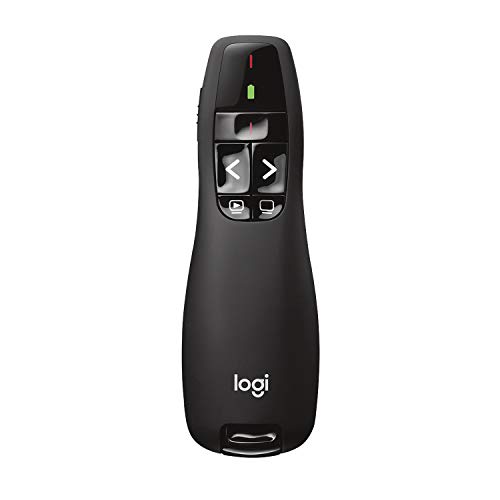
Pros
- Plug-and-play simplicity with no software setup needed
- Bright red laser pointer works well in moderately lit rooms
- Long 50-foot range gives flexibility during presentations
- Receiver stores securely in the remote for easy transport
Cons
- Requires AAA batteries (not included), and battery life may vary with use
- Laser pointer is red, not green, which may be less visible in very bright environments
- Limited functionality - only controls slideshow navigation and laser pointer; no advanced features like screen highlight
The Logitech R400 Wireless Presenter is a straightforward, no-fuss presentation tool designed to make slideshow control effortless. It is not a firearm or shooting accessory; rather, it is an office productivity device aimed at business professionals, educators, and anyone who regularly presents to groups. That said, the R400 excels in its intended role with a bright red Class 2 laser pointer and a reliable 2.4GHz RF connection.
For the target audience of presenters, the R400 offers excellent ease of use. Simply plug the included USB-A receiver into a computer, and the remote works instantly with PowerPoint and most other slideshow software. The wireless range of up to 50 feet allows you to walk around the room, making it easier to engage with your audience. The intuitive buttons on the remote are clearly labeled for next, previous, and laser, so even beginners can start presenting without a steep learning curve.
Build quality is typical of Logitech products: solid plastic construction that feels durable enough for regular travel. The remote weighs only about 0.22 pounds and measures 1.9 x 6.2 x 8 inches, making it pocket-friendly. The receiver stores inside the remote when not in use, a thoughtful feature that prevents misplacing the tiny USB dongle. Battery life depends on the AAA cells used, but with typical use, the remote should last through many presentations before needing a change.
A realistic limitation is that the laser pointer is red, which may be harder to see in brightly lit rooms or on certain backgrounds. Green lasers are generally more visible, but the R400 opts for red to keep costs low and battery consumption modest. Also, the remote only controls basic slide navigation and the laser; it lacks advanced features like volume control or screen annotation. For most straightforward presentations, however, these omissions are minor.
In terms of practicality, the R400 is a solid choice for anyone who needs a reliable wireless presenter without breaking the bank. It is particularly well-suited for teachers, corporate trainers, sales professionals, and conference speakers. While it has no place in a firearm or shooting context, it remains a highly recommended accessory for the modern presenter focusing on clear communication and mobility.
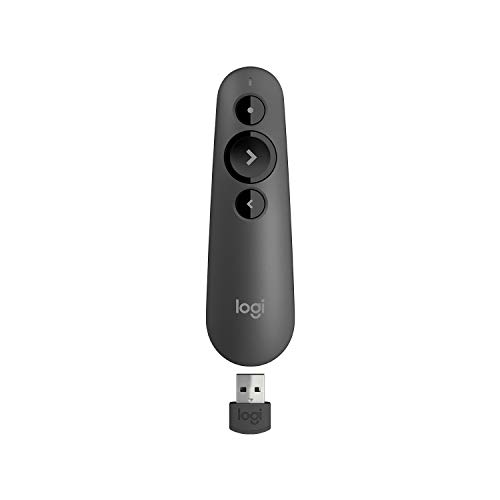
Pros
- Long 65-foot range allows instructors to move freely around a classroom or outdoor briefing area
- Dual connectivity options (USB receiver and Bluetooth) provide reliable pairing with various devices
- Built-in USB receiver storage keeps the dongle safe and prevents loss during transport
- Extended battery life of up to 12 months minimizes maintenance between training sessions
- Compatible with multiple operating systems and presentation apps for versatility
Cons
- Laser pointer is red-only; green laser may be preferred for brighter visibility in outdoor settings
- Requires Logitech Presentation App for full customization and timer features, which is only available on Windows and Mac
- No built-in storage for slides or files; relies entirely on connected device
The Logitech R500s Wireless Presenter is a presentation remote designed for professional use, but it also serves as a practical tool for firearms instructors, hunting guides, and shooting range coordinators. While not a firearm accessory itself, this device excels in delivering clear, hands-free slide control during safety briefings, hunting strategy sessions, or competitive shooting rule explanations. Its red laser pointer allows instructors to pinpoint specific areas on target diagrams or range maps, making it a valuable asset for any training environment.
Best suited for firearms instructors, hunting guides, and outdoor educators, the R500s offers a 65-foot operating range that lets you move freely around a classroom, pavilion, or even an outdoor range. The dual connectivity via USB receiver or Bluetooth ensures compatibility with laptops, tablets, and smartphones used in modern training setups. For example, you can pair it with a tablet running a shooting drill app or a laptop showing a hunting safety presentation. The long battery life of up to 12 months on a single AAA battery means you won't have to worry about power during a busy season of classes or hunts.
Performance-wise, the R500s delivers reliable slide transitions and a bright red laser that works well in indoor settings. The laser is effective for pointing out details on standard projection screens or whiteboards, though it may be less visible outdoors in direct sunlight. The Logitech Presentation App (available for Windows and Mac) adds useful features like an on-screen timer for timed drills or presentations, and the ability to customize button functions for quick access to black screen or slide skip. The smart battery management system is a thoughtful touch: when the battery gets low, it disables the laser to preserve power for an extra week of presentations.
Build quality is solid, with a compact polymer body that feels durable enough for regular use in a range bag or pocket. The tiny USB receiver stores inside the remote, preventing loss. The buttons are tactile and responsive, and the overall design is simple and intuitive. Setup is straightforward: plug in the receiver or pair via Bluetooth, and it works immediately with most presentation software. No complex installation is required for basic functionality.
One realistic limitation is that the laser is red, not green. Green lasers are often preferred for outdoor use because they are more visible in daylight. Additionally, the full customization and timer features require installing the Logitech Presentation App, which is only available on Windows and Mac. Users on iOS or Android will have basic slide control but miss the advanced options. The R500s also lacks a built-in memory for storing slides, so you must always have your device connected.
Overall, the Logitech R500s is a practical investment for any firearms instructor, hunting guide, or shooting range manager who frequently gives presentations or conducts training sessions. Its reliable connectivity, long range, and extended battery life make it a convenient tool for keeping your audience engaged and informed. For those who need a simple, effective presentation clicker with a laser pointer for indoor use, this is a solid choice.
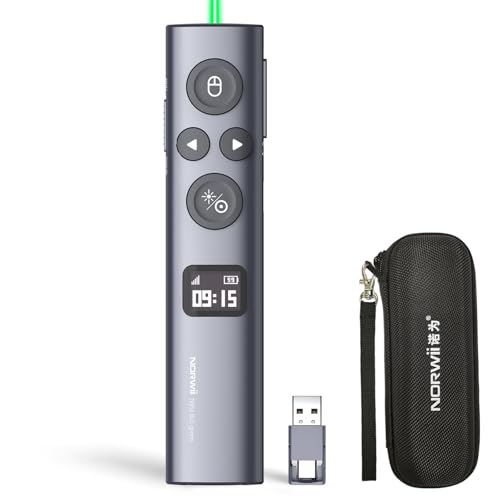
Pros
- Helps instructors manage presentation timing with vibration alerts
- Works with both TV and projection screens for versatile setups
- Easy to set up and use with no installation required for basic functions
- OLED display keeps you informed of battery and connection status
Cons
- Battery life may require recharging before long training days
- Requires proprietary software for full advanced features, which may trigger antivirus alerts
- Not a firearm-specific accessory - limited to presentation use only
The Norwii N95s BLE Presentation Clicker is a wireless presenter remote designed for slide control during speeches, training sessions, or classroom lectures. Although it is not a firearm or shooting accessory, its features can be particularly useful for firearms instructors who deliver range safety briefings, classroom training, or competitive shooting presentations. The device combines a digital pointer, countdown timer, and OLED display to help presenters stay on track and engage their audience.
For sport shooters, hunters, and home defense owners who also teach or present, this clicker offers practical advantages. The countdown vibration alert can be set to notify you 10, 5, or 0 minutes before the end of your allotted time, helping you pace your class or briefing without constantly glancing at a clock. This is especially valuable for firearms instructors managing multi-session training events or range orientations.
The digital pointer works seamlessly on TV screens, while the physical green laser pointer is suitable for projection screens. The clicker also provides mouse cursor control, allowing you to left-click, double-click, or right-click during your presentation. The OLED high-definition display shows signal strength, remaining power, and connection status, so you are never caught off guard by a dead battery or lost pairing.
Build quality is solid with a slim ABS and PC mixture housing that feels lightweight yet durable. The device supports multiple connection options via USB-A, USB-C, or a combination receiver, depending on the variant you choose. Setup is straightforward: plug in the receiver, open your presentation software, and it works immediately in full-screen mode without extra installation. For advanced features like custom icons and countdown programming, Norwii provides a signed software application that may trigger antivirus false positives, which is normal per the manufacturer.
Realistic limitations include reliance on batteries that may need recharging before extended use, and the requirement of the official software for full functionality. The clicker is not a firearm accessory, so its utility is limited to presentation contexts. However, for firearms instructors, outdoor educators, or anyone who gives training talks at the range or in the field, the Norwii N95s can be a reliable tool to enhance your teaching effectiveness. Gift buyers shopping for a shooting enthusiast who also presents frequently might find this a thoughtful addition.
Frequently Asked Questions
Why do standard red laser pointers fail to show up on LCD and LED television screens?
Traditional red lasers fail on television displays because LCD and LED panels absorb and diffuse narrow red wavelengths. Unlike projection fabrics that reflect ambient light back to viewers, television screens emit direct backlight through polarized glass that washes out standard red dots. While dedicated targeting optics like a laser sight for Desert Eagle achieve crisp contrast against opaque physical targets, flat television monitors require higher-contrast green diodes or on-screen virtual cursors to stay visible.
Does a green laser pointer work effectively on an LCD TV?
Yes, high-output green laser pointers offer significantly better visibility on television screens than conventional red beams. The human eye perceives green light around 532nm far more vividly than red wavelengths, helping remotes like the Logitech Wireless Presenter R800 cut through bright panel illumination. However, heavy anti-glare coatings and dark presentation slides can still reduce visibility compared to traditional white projection screens.
How does a digital pointer differ from a physical laser beam for presentations?
A digital pointer projects a virtual graphic directly onto the computer display rather than shining an external light beam. Remotes like the Norwii N95s utilize internal gyroscopes and companion software to display an on-screen spotlight, magnifier, or colored dot across connected LCD monitors and video calls. This approach bypasses panel reflections entirely, ensuring your highlighted points remain clearly visible to in-person and remote viewers.
What wireless range should you look for in a presentation remote?
Most meeting presenters need a wireless operating range between 50 and 100 feet to move comfortably around conference spaces. Basic remotes like the Logitech Wireless Presenter R400 offer reliable 50-foot control via 2.4GHz RF receivers, whereas extended models like the QUI Presentation Clicker list wireless ranges up to 328 feet for large auditoriums.
Can you connect presentation clickers without installing software?
Yes, standard presentation clickers function immediately through plug-and-play USB receivers without extra software. Remotes such as the Logitech Wireless Presenter R800 and QUI Presentation Clicker translate button presses into standard keyboard commands like Page Up and Page Down instantly. Proprietary apps are only necessary if you want advanced customization, such as the on-screen digital magnification tools on the Norwii N95s.


Write Your Review
No reviews yet. Be the first to share your experience!